//Block search for knowledge base / portal
System Maintenance: BACB accounts will be unavailable from Friday, June 26, at 5:00 p.m. (MT), to Monday, June 29, at 9:00 a.m. (MT). Thank you for your patience.
Skip to main content
Print

How do I submit a name change request in my BACB portal account?

  • Select My Account in the top right-hand corner of the menu, then click Profile Settings.
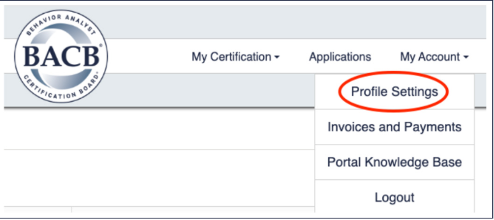
  • Account menu with Profile Settings option highlighted.
  • On the left-hand side of the screen, select Name Updates.
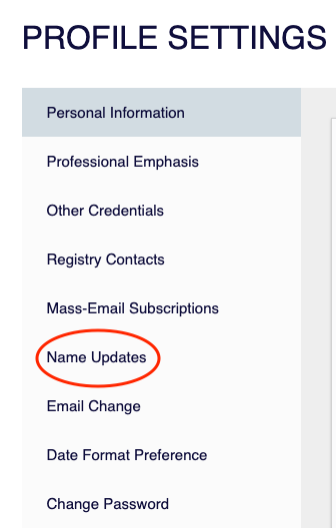
  • Profile Settings page with Name Updates option highlighted in the left-hand menu.
  • Select the reason for your name change request and follow the instructions that appear for that option. Please note that a government-issued ID and/or court documents will be required with your submission.
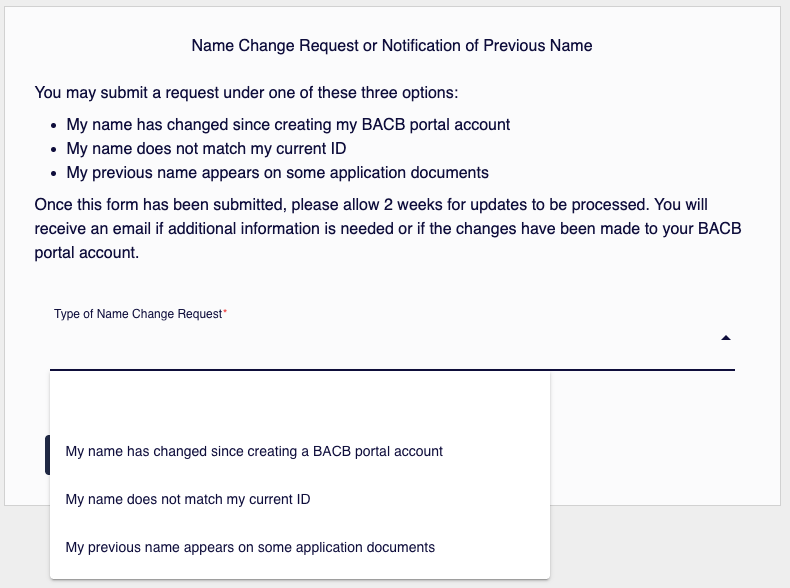
  • Name Change Request screen with dropdown options for selecting the reason for a name change.