//Block search for knowledge base / portal
BACB Closure: Our office will be closed on Monday, May 25. We will resume normal business hours on Tuesday, May 26.
Skip to main content
Print

How can I change my email address?

  • Select My Account in the top-right corner of the menu, then click Profile Settings.
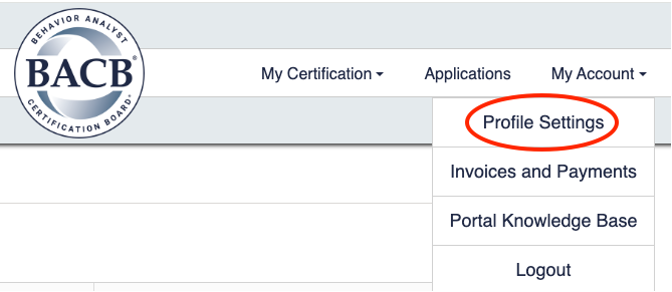
  • Account menu with Profile Settings option highlighted
  • On the left-hand side of the screen, click Email Change to update your email address.
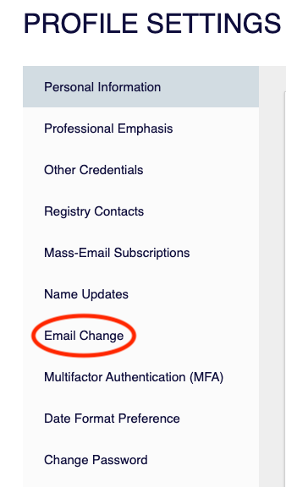
  • Profile Settings page showing Email Change option selected in left navigation
  • Enter your new email address, then select Send Verification Code.
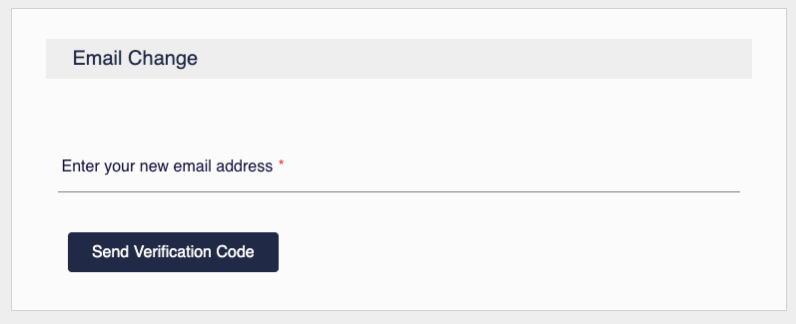
  • Email Change form with field to enter new email address and Send Verification Code button
  • Enter the verification code sent to your new email address, then select Verify Code.
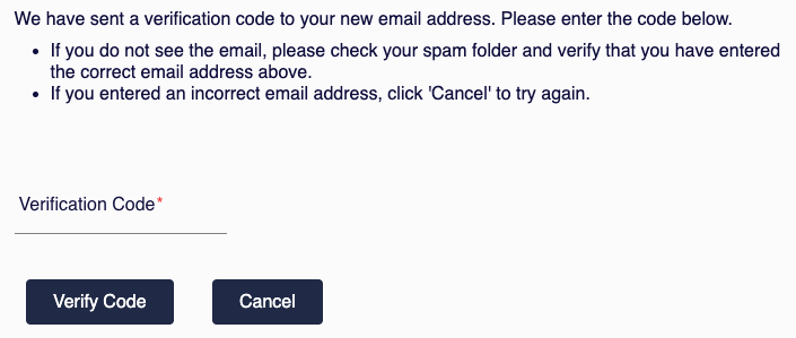
  • Verification screen with instructions, a required Verification Code input field, and Verify Code and Cancel buttons.