Portal Knowledge Base
How can I check my application status?
- You can view your application status in the Applications widget in your BACB portal account.
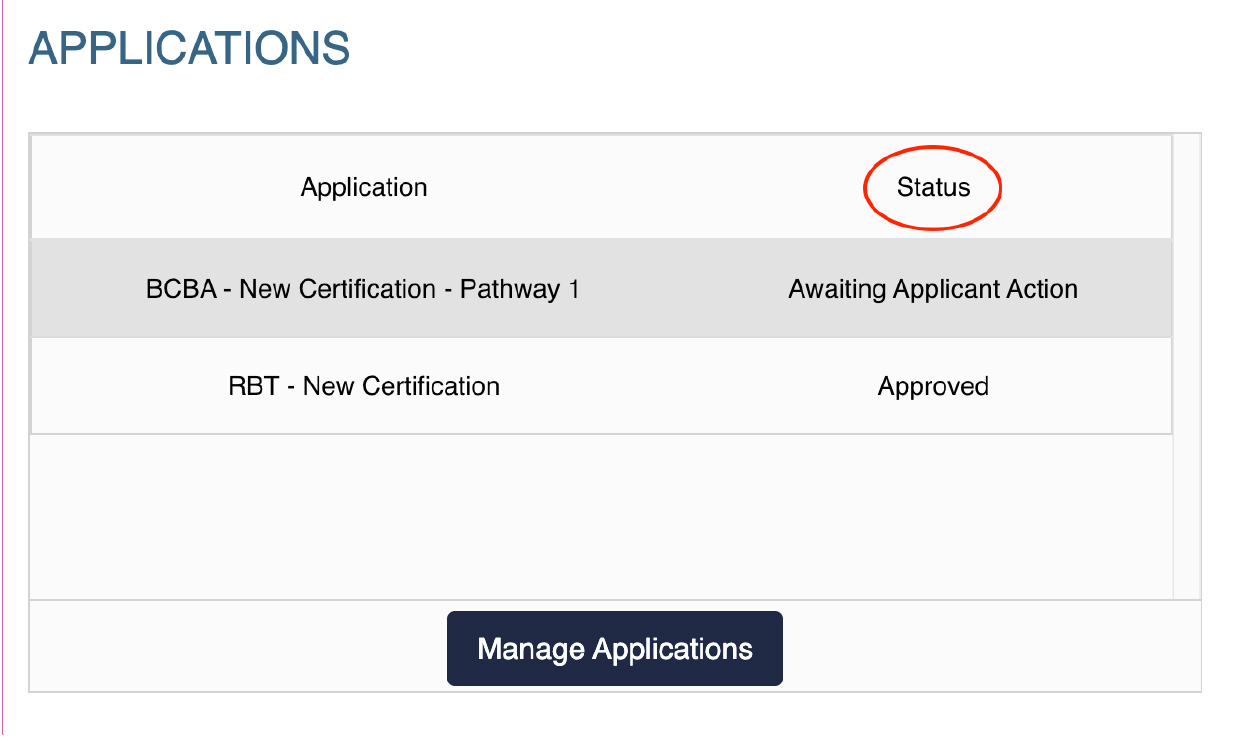
- The following table describes the various application statuses and what each one means:
| Your application shows the following status | What this status means | Your next steps |
| Incomplete | You have not completed your application, so it has not been submitted for review. | Click the pencil icon to edit your application. Complete all required fields, then submit your application. |
| Approved—Exam Authorization Confirmed | Your application has been reviewed and approved, but you have not yet taken the certification examination. | Schedule your certification examination. |
| Submitted—Awaiting Payment and Documents | Your application has been submitted, but your payment and transcript(s) have not been received. | Confirm that your official transcript(s) and payment have been sent to the BACB. |
| Submitted—Awaiting Payment | Your application and supporting documents have been received. Your application will be reviewed once payment is received. | Click My Account, then select Invoices and Payment to submit your payment. |
| Submitted—Awaiting Documents | Your transcript(s) have not been received. | Contact your university to request that your transcript(s) be sent to the BACB. |
| Under Review | Your application is considered complete, and payment has been received. BACB staff will review your application and contact you if additional documentation is needed. | Monitor your email and respond to any requests for further documentation. |
| Approved: Pass/Fail | Related to examination results. | Pass: No action required. Fail: Complete a retake application. |
| Awaiting Applicant Action | Additional information or documents are required to continue processing your application. | Check the Action Items widget in your BACB portal account. Complete and submit any outstanding action items. |
| Expired | The application was created more than 90 days ago and is no longer active. | If you are still interested in applying, select and complete a new application. |
| Approved | Recertification, VIS, Return from VIS, or BCBA-D application approved. | No action required. |